Frequently Asked Questions
Frequently Asked Questions
You can apply online, via WhatsApp on 0860 900 900 or at a selected PEP, Ackermans or Dunns store within South Africa.
You will need a valid SA ID or a passport if you are a foreigner. A picture of you will be taken online or in store to complete the application. Once your application is completed and approved, a small Upfront Payment (where applicable) is required when collecting your device in store. Remember to take along your ID or passport and the the SMS with your reference number.
To find out which devices are available through FoneYam, visit www.foneyam.co.za or ask a FoneYam assistant at selected PEP, Ackermans or Dunns stores.
Blue Offer:
Available to new customers and returning customers.
Rental contract period: 13 months and 7 days.
Payments: Upfront Payments, Day-7 Payment and 12 monthly rental payments.
Yellow Offer:
Available to selected customers that have completed their FoneYam contract.
Rental Contract Period: 19 months
Payments: 18 monthly payments.
The Yellow Offer will only be available to customers that is offered this option when applying for another FoneYam contract.
Blue Offer (12-month):
The rental contract period is 13 months and 7 days.
Yellow Offer (18-month):
The rental contract period is 19 months.
The Upfront Payment, where applicable, is 30% of the device retail price and is due when you collect your device in store. The exact Upfront Payment will be communicated to you once the selected device is scanned at the till during the collection in store. The Upfront Payment will also reflect in your Device Rental schedule.
Blue Offer (12-month):
Your first payment is due 7 days (‘Day-7 Payment’) after you have made your Upfront Payment and taken delivery of the device.
Yellow Offer (18-month)
There is no Day-7 Payment applicable to the Yellow Offer.
Your first payment will be due one month after the date on which you collected your device in store.
The due date and amount of your first payment will be stipulated in your Device Rental Schedule sent to you.
Blue Offer:
Your first monthly payment will be due 30 days after your Day-7 Payment and thereafter on the same day of every succeeding month until you have made all monthly rental payments.
Yellow Offer:
Your first monthly payment will be due one month after the date on which you collected your device in store.
The due date and amount of your monthly payment will be stipulated in your Device Rental Schedule sent to you .
Payments can be made via Pay@ at any Pay@ enabled store, including PEP, Ackermans, Dunns, Shoprite and PnP or online at payat.io. Use your 18-digit Pay@ reference number provided to you during your application when making payments. Alternatively, you can make an EFT payment to:
FoneYam
Standard Bank
Account Number: 070321078
Reference: Your 18-digit Pay@ reference number
Your Device Rental Schedule sent to you after approval, will include all your payment amounts and due dates. Make use of the following self-service channels to view your payment details and more:
- Dial *134*33011# free of charge
- Log in on foneyam.co.za
- Say “Hi” on WhatsApp. Our WhatsApp number is 0860 900 900.
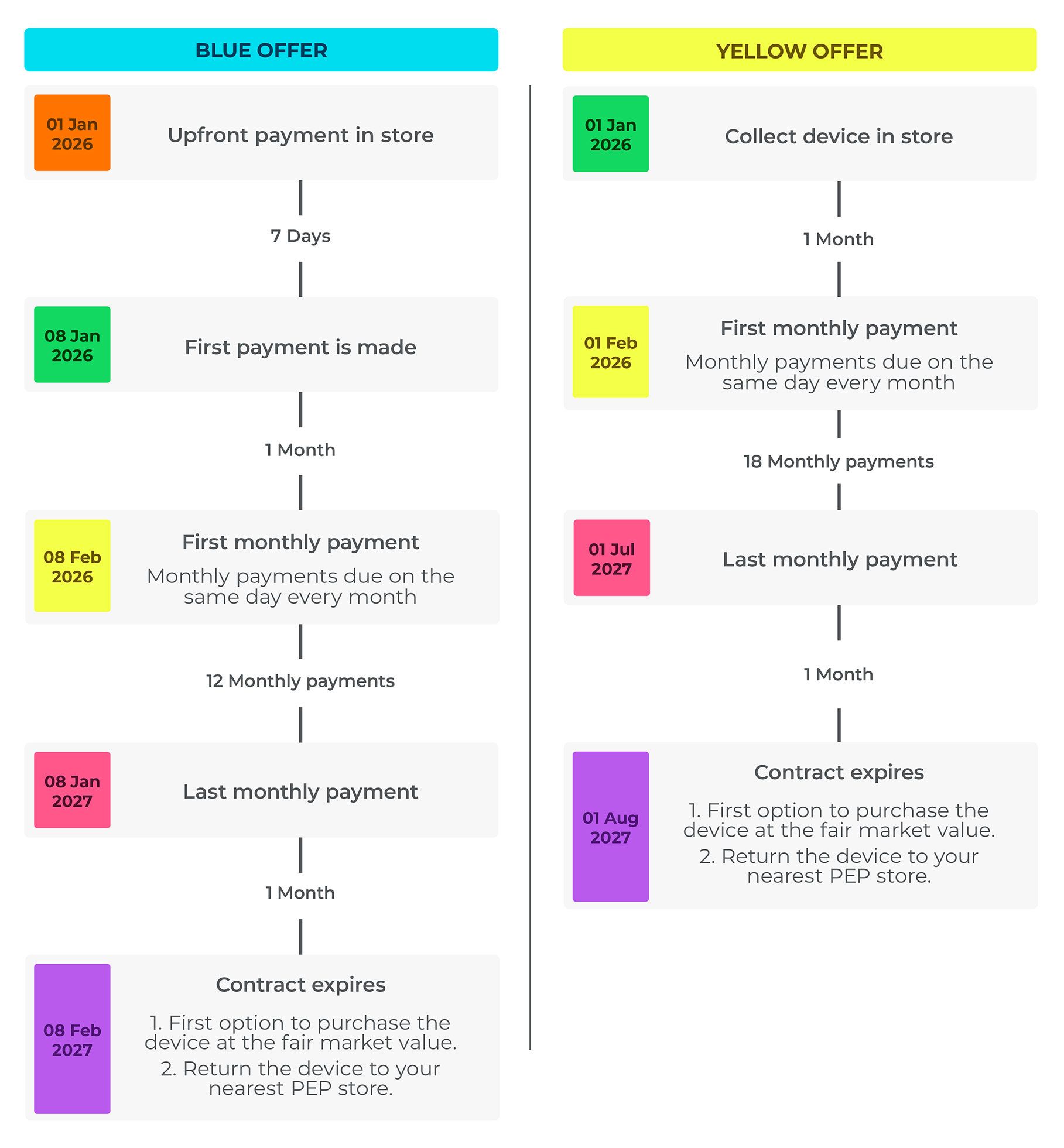
To illustrate your contract payment dates, refer to the timeline below as an example. Your specific payment due dates will be communicated to you during your application as well as in your Device Rental Schedule sent to you after approval.
Example of a customer’s contract payment timeline with a FoneYam application date of 1 January 2026:
If you fail to make a payment on time, we will lock your device remotely until payment is received. This means that you will not be able to make calls, send texts, or access data. You will only be able to contact the FoneYam contact centre on 0860 900 900 and make emergency calls.
Please let us know if you are having trouble making a payment or if you have any questions about your payment schedule in order to make timely arrangements. Call the FoneYam contact centre on 0860 900 900 or email us at info@foneyam.co.za.
If you have already made a payment and your device remains locked, please ensure that your SIM card has data (not social or WhatsApp-only bundles) or that the device is connected to Wi-Fi. If you have confirmed connectivity and your device is still locked, please contact us on 0860 900 900 and follow the menu prompts to unlock your device.
If the device has been lost or stolen, please visit www.foneyam.co.za/insurance to log the insurance claim online and upload all required supporting documents for processing. By logging the claim, the device will be locked remotely to protect your personal information. For agreements concluded on or after 4 November 2024, insurance might be applicable – please see clause 7 in the Terms and Conditions. For more info on our claims process, refer to How do I submit an insurance claim? in the FAQs.
All contracts concluded on or from 4 November 2024 will include insurance against your death, disability, loss of income and lost or stolen device. More information on the insurance can be found under clause 7 in the Terms and Conditions.
FoneYam insurance gives you peace of mind, at no cost to you.
As this is a rental agreement, FoneYam is the insured party and the insurer is Abacus.
Visit www.foneyam.co.za/insurance. In the event that your device is lost or stolen, please report your device as lost or stolen at the nearest police station. Complete an affidavit that includes: Your full name and surname, ID or Passport number, Contract Cellphone number, IMEI number of the device, ITC number and SAPS case or OB number and a brief description and date of the incident. Ensure a copy of your ID or Passport is certified. For further assistance, contact our call centre on 0860 900 900.
When a death, disability or loss of income claim is approved, you will no longer have to continue paying your contract.
If your contract was concluded on or after 4 November 2024 and a lost or stolen claim is approved, you will receive a replacement device, provided all outstanding payments have been made. You will receive an SMS with details to collect a new device. This replacement device will be of a similar value as the lost/stolen device. You will be expected to continue with your monthly payments. The replacement device is not covered for loss or theft as only the original device is covered.
If you accepted the terms and conditions of your contract on or after 20 April 2026 and a lost or stolen claim is approved, the contract will terminate on the date we inform you that the claim has been approved and you will no longer have to continue paying the contract.
At the end of your contract, you may exercise one of the following options:
1. You will have the first option (before anyone else) to purchase the device for the fair market value of the device to be determined at date of termination; or
2. Return the device to your nearest PEP store.
If you'd like to take up another FoneYam rental agreement, you have two great options:
Option 1: Blue Offer
You can upgrade to a more premium phone with a similar monthly payment, or choose a similar phone and pay less each month.
Option 2: Yellow Offer
No upfront payment, no Day 7 payment, and your monthly payments are spread out over 18 months for even more flexibility. The Yellow Offer will only be available to customers that is offered this option when applying for another FoneYam contract.
You may cancel the contract earlier by giving us 20 business days’ written notice. In such an event a reasonable cancellation penalty will be payable. The penalty will depend on whether you return the device or not.
Should you cancel, the following will apply:
1. You can exercise your option to purchase the device; or
2. Return the device.
You can use your existing SIM linked to any network provider or use the new SIM given to you in store as part of your application. The SIM initiated with your FoneYam contract must be:
1. kept in your device and,
2. in the original SIM slot (SIM slot 1) for the duration of the contract, unless you obtain prior approval from FoneYam to change your SIM.
Should you, without obtaining our prior approval, insert a SIM card into the device other than the one initiated with the device, the device will be locked. Should your device have a dual SIM slot, you need to keep the SIM in SIM slot 1 for the contract period. To link a new SIM to your FoneYam contract, please contact our contact centre on 0860 900 900.
Your device will be locked for the following reasons:
• You missed a payment that was due.
• You changed your SIM card without obtaining our prior approval.
• Your device was lost or stolen and you requested that we lock your device to protect your personal information.
• You do not have data or haven’t connected to WiFi for 30 days or more.
• Your contract has ended. Unless you exercised the first option to purchase the device in which event the device will be unlocked and the device locking software will be disabled.
Call the FoneYam contact centre on 0860 900 900 or email us at info@foneyam.co.za.